

Planning a kitchen remodel can feel like a massive undertaking, but having the right tools makes all the difference. It can shift the whole experience from stressful to genuinely exciting. Free kitchen design software gives you the power to play with layouts, test out different finishes, and sidestep expensive mistakes before the first hammer swings. This guide is here to walk you through the best options, closing the gap between the ideas in your head and a functional, beautiful kitchen.
Why Free Kitchen Design Software Is a Game-Changer
These tools have come a long way from clunky 2D planners. Today, they're powerful 3D visualizers that put professional-grade design right at your fingertips. We'll show you how to take the driver's seat on your project, communicate your vision clearly to contractors, and bring your dream kitchen to life with confidence.
Think of this software as more than just a fun gadget—it's a critical first step for any successful renovation. It empowers you to make smart, informed decisions by letting you test every idea virtually. That alone saves an incredible amount of time and money. Being able to truly see your space before committing to anything is priceless.
It's no surprise that demand for these tools is booming. The global market for kitchen design services, which includes this software, was valued at $6.73 billion in 2024 and is projected to climb to $7.11 billion by 2025. This isn't just a fleeting trend; it shows a real need from homeowners for better planning resources, fueled by the desire for smarter, more efficient kitchens.
See Your Ideas Come to Life and Catch Flaws Early
One of the biggest wins is seeing your concepts in a realistic 3D space. This is where you can spot practical problems that are almost impossible to catch on paper. For instance, you can easily check the workflow between the sink, stove, and refrigerator—the classic kitchen work triangle—to make sure it feels natural.
This visualization helps you catch potential layout disasters early. Will that cabinet door swing open and block a main walkway? Is there actually enough clearance for the fridge doors to open all the way? Answering these questions on a screen prevents costly changes once construction is underway. Planning accurately from the get-go is everything, which is why getting your kitchen design measurements right is so crucial.
Get on the Same Page with Your Contractor
A detailed 3D design acts as the perfect visual brief for your contractor or cabinet maker. Instead of fumbling with words to describe what you're picturing, you can simply show them.
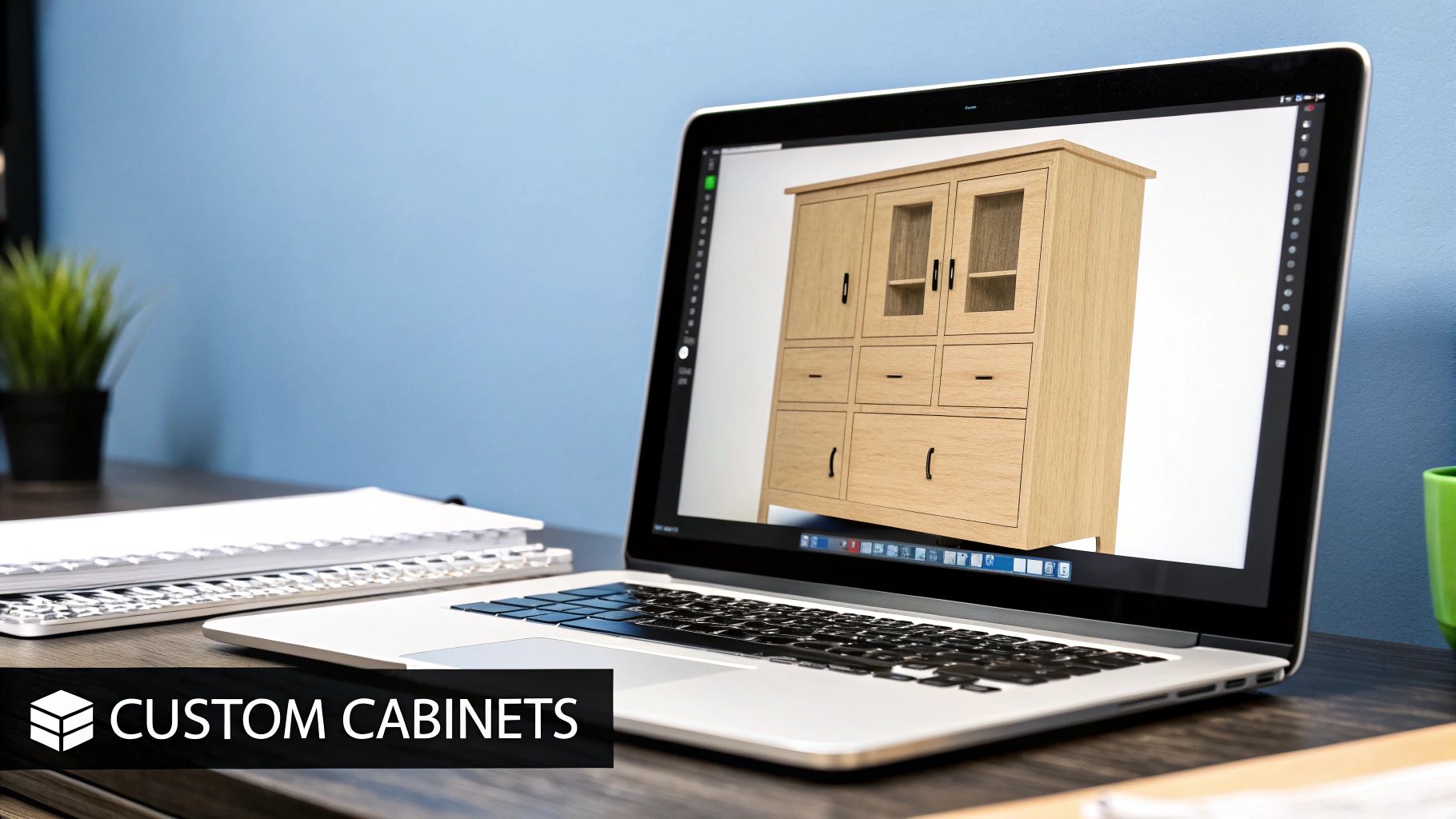
Here's an example of the kind of standard cabinetry components you'll be able to place and customize in most design software.

When everyone is looking at the same picture, misunderstandings disappear. This simple step ensures the final build actually matches your vision, leaving no room for "I thought you meant…" conversations.
How We Evaluated the Top Free Kitchen Planners
To give you recommendations you can actually trust, we rolled up our sleeves and put these tools to the test. We didn't approach this like professional designers with years of complex software experience. Instead, we stepped into the shoes of a real homeowner planning a DIY remodel.
This approach kept us focused on what truly matters for your project, not just a long list of obscure features. We wanted to find out which tools are genuinely helpful when you're trying to map out your dream kitchen.
Core Evaluation Criteria
We zeroed in on the essentials that make or break a kitchen planning tool. Here’s what we looked at:
- Ease of Use and Learning Curve: How fast can a total beginner get started? We wanted tools that felt intuitive right out of the box, preferably with simple drag-and-drop controls, not ones that required watching hours of tutorials.
- Feature Set Depth: We looked for a healthy balance of useful features. This meant having the basics covered—like 2D floor plans and 3D visualization—along with a decent library of cabinets, appliances, and finishes to choose from.
- Visualization Quality and Realism: How well does the software help you actually see your future kitchen? We judged the quality of the 3D renderings and whether the material textures looked believable or like something from a 90s video game.
- Export and Sharing Options: A beautiful design is pretty useless if you can't show it to anyone. We checked how easy it was to save, print, or share the plans with a contractor, partner, or friend.
This chart gives you a quick visual breakdown of how three of the most popular tools stacked up against our criteria.
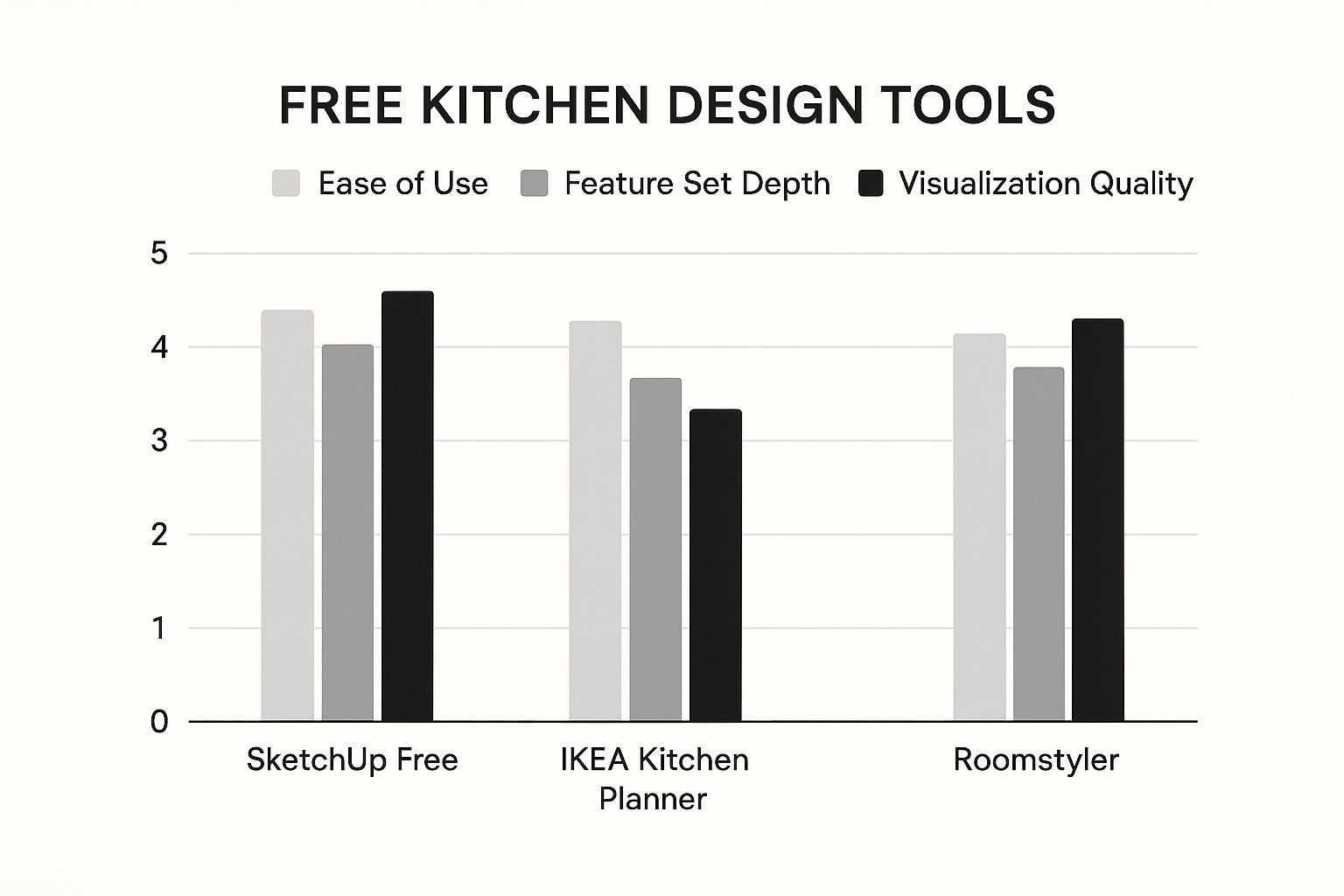
As you can see, there’s usually a trade-off. The easiest tools are sometimes the most limited, while the more powerful ones can feel overwhelming. Our goal is to help you find the best free kitchen design software that hits that sweet spot for your specific needs and comfort level. This transparent, hands-on approach means our advice is grounded in real-world use, guiding you to a tool that’s the perfect fit.
A Detailed Comparison of Free Kitchen Design Tools
Stepping into the world of free kitchen design software can feel like a lot to take in. Every tool claims it’s the easiest or the most powerful, but which one is actually right for your project? To get you a real answer, we're going to skip the generic pro/con lists and do a head-to-head comparison based on how these tools work in the real world.
We'll look at SketchUp Free, IKEA Kitchen Planner, and Roomstyler to see where each one truly shines. Whether you're planning a completely custom build with bespoke cabinets or just need a simple tool to map out a quick layout, one of these will be the perfect fit.
SketchUp Free: The Powerhouse For Customization
When it comes to pure design freedom, SketchUp Free is the undisputed champ. Other tools often lock you into their pre-made libraries, but SketchUp gives you a totally blank canvas. It's a genuine 3D modeling program, which means you can build literally anything from scratch, making it the best free kitchen design software for projects that are truly one-of-a-kind.
This level of control is exactly what you need if you're planning non-standard cabinet sizes, a uniquely shaped island, or custom features like a hidden appliance garage. If you can dream it up, you can build it in SketchUp.
Of course, all that power comes with a steeper learning curve. The interface isn't a simple drag-and-drop system, so you’ll need to spend a few hours getting the hang of the basic tools—like Push/Pull, Line, and Orbit. For anyone serious about a DIY build or needing to show a cabinet maker a very specific vision, the time investment is absolutely worth it.
Key Differentiator: SketchUp Free isn't really a "kitchen planner"—it's a full-blown "3D modeling tool." Its real strength is creating completely bespoke elements from the ground up, giving you a level of control no other free software can touch.
IKEA Kitchen Planner: The Ultimate In Simplicity
On the complete opposite end of the spectrum is the IKEA Kitchen Planner. This tool was built for one job, and it does that job perfectly: designing a kitchen with products from the IKEA catalog. The interface couldn't be more intuitive, using a simple drag-and-drop system that lets you put together a functional layout in minutes.
Its biggest selling point is the seamless connection to IKEA’s entire ecosystem. As you add cabinets, countertops, and appliances, the software generates a real-time shopping list with exact pricing. This makes budgeting crystal clear and takes all the guesswork out of the equation.
The trade-off, as you might expect, is that you’re completely fenced into the IKEA world. You can't import custom items or play around with products from other brands. If you're planning an IKEA kitchen, this tool is non-negotiable. But if your project involves custom work or items from other stores, you'll find it far too limiting.
Roomstyler: The Best For Realistic Visualization
Roomstyler hits that sweet spot right between ease of use and visual punch. It doesn't have the raw modeling power of SketchUp, but it absolutely excels at creating gorgeous, photorealistic 3D renderings that help you see exactly what your finished kitchen will look like. It’s incredibly user-friendly, with a drag-and-drop interface and a huge library of both generic and brand-name furniture and finishes.
This makes Roomstyler the go-to choice for anyone focused on the aesthetic side of things—like trying out different color palettes, countertop materials, or backsplash tiles. You can really get a feel for how different textures and lighting will play out in your actual space.
Its cabinet options are more flexible than IKEA's, but they are still based on pre-set modules, so deep customization is off the table. Think of it as the perfect tool for creating a mood board and nailing down the look and feel of your kitchen before you get into the nitty-gritty technical details.
The rise of free kitchen design software has followed the broader adoption of tech in home renovation, especially since the smart home boom started around 2015. While paid software has more advanced features, the high cost and steep learning curve keep it out of reach for most people. Free tools have democratized kitchen planning, letting millions of homeowners experiment with layouts and materials. As of 2025, tools like IKEA Kitchen Planner and SketchUp Free have a combined user base of over 10 million people worldwide, with growth rates hitting 15%-20% annually since 2020. This trend has even pushed premium software companies to offer free versions, blurring the lines between paid and free. You can read more about these changes in this in-depth analysis of kitchen design software trends.
Feature Comparison of Top Free Kitchen Design Software
To help you decide at a glance, this table breaks down the key differences between our top three contenders. It’s designed to give you a quick, side-by-side look at what each tool does best.
| Software | Best For | 3D Visualization | Custom Cabinets | Learning Curve | Export Options |
|---|---|---|---|---|---|
| SketchUp Free | Custom cabinet design & unique layouts | Good (requires skill) | Unlimited | High | Good (images, 3D models) |
| IKEA Planner | Planning an IKEA-specific kitchen | Basic 3D | None (IKEA products only) | Low | Excellent (shopping list, PDF) |
| Roomstyler | Visualizing finishes & overall aesthetics | High (photorealistic) | Limited (pre-set objects) | Low | Basic (images) |
Each tool serves a distinct purpose. If you're going for a fully custom build, SketchUp is your best bet. If you’re all-in on IKEA, their planner is a must. And if your main goal is to visualize the final look, Roomstyler is the clear winner.
Choosing the Right Software for Your Project
Picking the best free kitchen design software isn't just about a feature list. It's about finding the right tool for your specific job and, just as importantly, your skill level. The most powerful program in the world is useless if it’s too complex to learn, and a simple one is just plain frustrating if it can't bring your ideas to life.
Before you download anything, ask yourself one question: what’s my end goal? Are you just spitballing ideas and trying to decide between an L-shape and a galley layout? Or do you need a detailed blueprint for your contractor? Your answer will instantly cut the options in half and point you in the right direction.
For Quick Layout Exploration and Beginners
If you're a total newbie just trying to get a feel for your space, your number one priority should be simplicity. You're looking for an intuitive, drag-and-drop tool that doesn't come with a massive learning curve. The name of the game is speed, not photorealistic perfection.
- Best Choice: IKEA Kitchen Planner or Roomstyler.
- Why: These tools were built for quick visualization. You can punch in your room dimensions and start dropping in cabinets in minutes. It's the fastest way to see if that island actually fits or if a peninsula would close things off too much.
Don't get hung up on finishes or cabinet styles just yet. Focus on nailing the core layout. This is the stage where you figure out the flow and function before getting lost in the weeds.
For Detailed Custom Cabinetry Projects
When you’re planning for custom cabinets or dealing with quirky architectural features, you need precision. A library of standard-sized boxes just won't cut it when you're designing something truly unique. For a deeper dive into tools built for this kind of detailed work, our comprehensive cabinet design software reviews can give you some more targeted advice.
- Best Choice: SketchUp Free.
- Why: This isn't just a planner; it's a full-blown 3D modeling program. It lets you build every single component from scratch. This is non-negotiable if you need to communicate exact specs to a cabinet maker or you're tackling a complex DIY build where every millimeter matters.
This approach demands more patience, for sure. But the reward is a design that is a perfect, unambiguous reflection of your vision, leaving zero room for error when it's time to build.
For Finalizing Aesthetics and Finishes
Once you've locked in the layout, it's time for the fun part: aesthetics. This is where you play with countertop materials, backsplash tile, cabinet colors, and hardware. The right software for this phase needs to deliver high-quality renderings and have a massive library of realistic materials.
- Best Choice: Roomstyler or Homestyler.
- Why: These tools are masters of creating life-like images. Seeing how a marble countertop looks next to dark walnut cabinets under realistic lighting is what helps you make confident design choices and avoid expensive mistakes. If you need some inspiration, checking out some fresh kitchen renovation ideas can really help you see what’s possible.
Using Design Software for Custom Cabinetry
Custom cabinets are the secret ingredient that transforms a good kitchen into a great one. They turn a cookie-cutter layout into a space built just for you. While stock cabinets get the job done, designing with custom dimensions opens up a world of creativity and function. This is exactly where the best free kitchen design software proves its worth for any homeowner with a vision.
Forget being boxed in by standard 30- or 36-inch cabinet modules. These programs are your digital sandbox, letting you map out unique sizes that squeeze every last inch of utility from your kitchen. You can finally visualize those special touches you’ve been dreaming of, like built-in appliance garages, pull-out spice racks, or cabinets cleverly designed around an awkward window. It’s the perfect way to test-drive your ideas before a single piece of wood is cut.
For example, you could model a wall of cabinets that soars to meet a ten-foot ceiling. Or maybe you want to design a slender pantry cabinet to fill that otherwise useless 9-inch gap next to the fridge. Getting this level of detail down ensures your plan is both exciting and completely buildable.
Planning for Unique Features and Finishes
Beyond getting the sizes right, free software is fantastic for seeing how different materials and finishes will look in your space. A basic planner might just give you a generic "wood" option, but the more advanced tools let you play with textures and colors that mimic specific species like quarter-sawn oak or classic painted maple.
This is a huge advantage for making smart aesthetic choices. You can see how a particular wood grain pairs with your countertop and backsplash selections, which can save you from some very expensive design mistakes down the road.
One thing to keep in mind: free software usually comes with generic material libraries. Use the program to lock down the style and color palette you're after, but always get physical samples from your cabinet maker before signing off. A computer screen can never quite capture the true texture and color of the real thing.
This initial design phase is also the perfect time to map out your storage strategy. Our guide on how to plan kitchen cabinets is a great place to start thinking through the functional side of your layout before you jump into the software.
Translating Your Digital Design into Reality
At the end of the day, the goal is to create a clear, actionable plan. A detailed 3D rendering and a 2D floor plan with precise measurements are your most powerful assets. These documents become the common language spoken between you, your contractor, and your cabinet maker, leaving no room for error.
Once your design feels right, export everything in the highest quality possible. You'll want to have:
- A top-down 2D floor plan with all key dimensions clearly labeled.
- Several 3D renderings from different angles to showcase the overall design.
- Close-up views of any custom features or unique cabinet setups.
This trend of homeowners taking the lead in detailed design is really taking off. Recent data shows a major market shift toward highly customized and eco-friendly kitchen solutions. Despite a small dip in overall cabinet sales in early 2024, custom cabinet orders actually jumped by 3.9%, and the average amount spent on these bespoke projects rose by 12%. It’s clear that homeowners are using these digital tools for more than just inspiration—they're using them to make serious, well-informed buying decisions. You can get more insights on these cabinet market trends on castacabinetry.com.
When you present this complete package to a professional, it eliminates any guesswork. It’s the final step that confirms your digital vision can be brought to life as a stunning and functional reality, perfectly matching the custom kitchen you designed.
Got Questions About Kitchen Design Software? We've Got Answers
Once you start exploring the best free kitchen design software, you're bound to have a few questions. These tools are fantastic for getting your ideas down, but knowing their sweet spots—and their limitations—is the key to a smooth project. Let's walk through some of the most common questions homeowners ask.
Think of this as your quick-start guide to making sure what you build on screen is what you get in your home. We'll cover everything from getting measurements right to handing off your final plans.
Can I Get Accurate Measurements for Contractors from This Software?
This is a big one, and the short answer is: almost, but not quite. Most free software is brilliant for getting your layout and spacing just right for the initial planning phase. It’s the perfect way to show your contractor exactly what you’re imagining.
However, these digital measurements are no substitute for a professional with a tape measure on-site. Use the software to lock in your perfect design, but always have your contractor physically verify every single dimension before a single piece of wood is cut or an appliance is ordered.
Think of the software as your master planning tool and their tape measure as the final building tool. This two-step process ensures your custom cabinets and appliances fit perfectly without any costly surprises on installation day.
Are the Product Libraries in These Tools Kept Up to Date?
This really depends on the software you're using. Brand-specific tools, like the IKEA Kitchen Planner, are always perfectly in sync with their own inventory. That's their main strength—if you see it, you can buy it.
On the other hand, general design platforms like Roomstyler or Homestyler have massive libraries with thousands of items, but they can’t always guarantee those specific products are still on the market. It’s safer to treat the objects in these tools as placeholders for size, style, and color. Before you commit, double-check the exact models and dimensions with the actual retailer.
What Are the Biggest Limitations of Free Software?
Knowing the trade-offs ahead of time helps you work smarter. The main limitations of free kitchen design tools usually fall into three camps:
- Rendering Quality: They give you a great visual, but they typically don't produce the stunning, photorealistic images you'd get from paid, professional-grade software.
- Advanced Customization: If you're planning unique architectural details, complex ceiling angles, or truly intricate cabinet designs, you might hit a wall. These tools are built for more standard layouts.
- Technical Support: You won’t find a dedicated support line. Help usually comes from community forums and online tutorials, so you'll need to be comfortable finding answers on your own.
How Do I Take My Design from Screen to Reality?
This is where the fun really starts. Once you've finalized your design, the goal is to create a complete package for your renovation team. Export your plan in a few different formats to make it as clear as possible.
You'll want a 2D floor plan showing clear dimensions and a few 3D renderings from different viewpoints. These documents become the foundation for every conversation you have with contractors and designers, helping you get accurate quotes and ensuring everyone is working toward the exact same vision.
Ready to turn your vision into a beautifully crafted reality? At Sinclair Cabinetry inc, we specialize in building the custom cabinets you've designed. Our experts can work from your plans to create high-quality, real wood cabinetry that brings your dream kitchen to life. Learn more about our custom cabinet services.